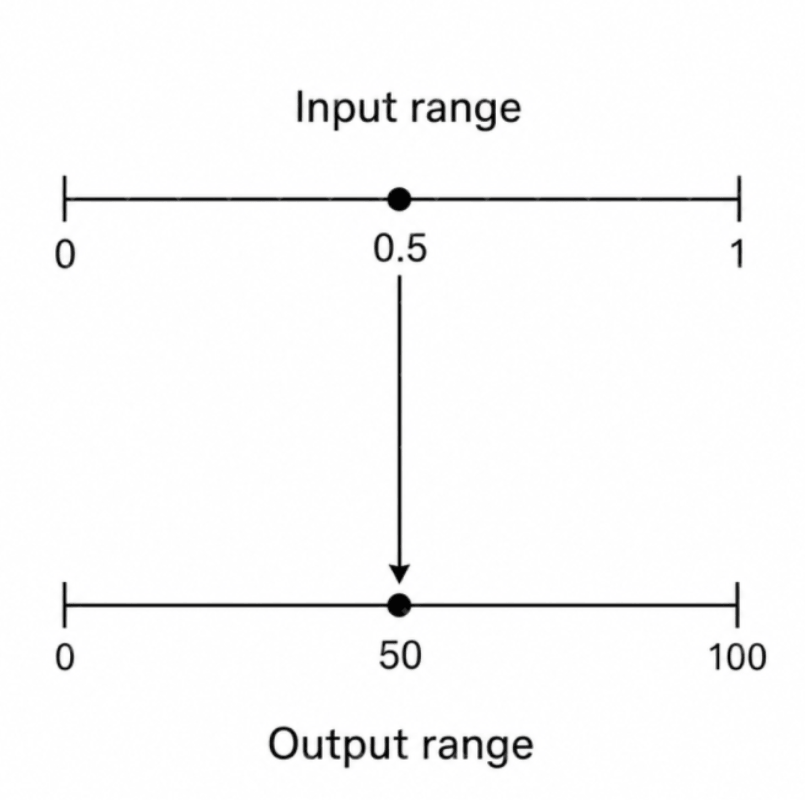
You have a number in one range and need it in another. A slider reads 0 to 100, but your audio gain wants -60dB to 0dB. Same value, different scale. That's remapping. Some engines ship it, some don't — either way it's worth understanding the math so you can write it yourself when you need to.
The math
You have an input value v in range [inMin, inMax]. You want it expressed in range [outMin, outMax], preserving its relative position.
Two steps:
- Figure out where
vsits in the input range as a fraction from 0 to 1:(v - inMin) / (inMax - inMin) - Apply that fraction to the output range:
outMin + fraction * (outMax - outMin)
Combined: out = outMin + (v - inMin) * (outMax - outMin) / (inMax - inMin)
If v == inMin, you get outMin. If v == inMax, you get outMax. If v is halfway, you get the midpoint of the output. A value of zero is perfectly valid as an input — it's just a number in the range like any other. The output range can be inverted (outMin > outMax) and the math still works — useful when you want a value to decrease as input increases.
The one thing to watch: inMax - inMin must not be zero. That only happens when the input range has no width at all — i.e. inMin == inMax, like Remap(v, 5, 5, ...). That's a degenerate range, not a zero value. Guard against it or make sure your caller never sends one in.
Implementations
C# (plain)
public static float Remap(float value, float inMin, float inMax, float outMin, float outMax)
{
    return outMin + (value - inMin) * (outMax - outMin) / (inMax - inMin);
}

public static float RemapClamped(float value, float inMin, float inMax, float outMin, float outMax)
{
    float t = Math.Clamp((value - inMin) / (inMax - inMin), 0f, 1f);
    return outMin + t * (outMax - outMin);
}
C# (Unity)
Unity gives you Mathf.Lerp and Mathf.InverseLerp, and InverseLerp is already clamped to 0..1. The clamped version is a one-liner. The unclamped version needs the manual formula because InverseLerp won't extrapolate.
using UnityEngine;

public static class MathExtensions
{
    public static float Remap(float value, float inMin, float inMax, float outMin, float outMax)
    {
        return outMin + (value - inMin) * (outMax - outMin) / (inMax - inMin);
    }

    public static float RemapClamped(float value, float inMin, float inMax, float outMin, float outMax)
    {
        return Mathf.Lerp(outMin, outMax, Mathf.InverseLerp(inMin, inMax, value));
    }
}
C++ (plain)
#include <algorithm>

float remap(float value, float inMin, float inMax, float outMin, float outMax)
{
    return outMin + (value - inMin) * (outMax - outMin) / (inMax - inMin);
}

float remapClamped(float value, float inMin, float inMax, float outMin, float outMax)
{
    float t = std::clamp((value - inMin) / (inMax - inMin), 0.0f, 1.0f);
    return outMin + t * (outMax - outMin);
}
C++ (Unreal Engine)
Unreal ships FMath::GetMappedRangeValueUnclamped and FMath::GetMappedRangeValueClamped, which take FVector2D for the ranges. Use them.
#include "Math/UnrealMathUtility.h"

float Volume = FMath::GetMappedRangeValueClamped(
    FVector2D(0.f, 100.f),   // input range (slider)
    FVector2D(-60.f, 0.f),   // output range (decibels)
    SliderValue
);

float Parallax = FMath::GetMappedRangeValueUnclamped(
    FVector2D(0.f, 1.f),
    FVector2D(-200.f, 200.f),
    ScrollFraction
);
If you need it without the engine math lib:
float Remap(float Value, float InMin, float InMax, float OutMin, float OutMax)
{
    return OutMin + (Value - InMin) * (OutMax - OutMin) / (InMax - InMin);
}
Python
def remap(value, in_min, in_max, out_min, out_max):
    return out_min + (value - in_min) * (out_max - out_min) / (in_max - in_min)

def remap_clamped(value, in_min, in_max, out_min, out_max):
    t = max(0.0, min(1.0, (value - in_min) / (in_max - in_min)))
    return out_min + t * (out_max - out_min)
If you're using NumPy and want to remap a whole array, numpy.interp does the clamped version directly:
import numpy as np
remapped = np.interp(values, [in_min, in_max], [out_min, out_max])
GDScript (Godot)
Godot has remap built in. It's unclamped.
var volume_db = remap(slider_value, 0.0, 100.0, -60.0, 0.0)For a clamped version:
func remap_clamped(value: float, in_min: float, in_max: float, out_min: float, out_max: float) -> float:
    var t = clamp((value - in_min) / (in_max - in_min), 0.0, 1.0)
    return lerp(out_min, out_max, t)
JavaScript
function remap(value, inMin, inMax, outMin, outMax) {
  return outMin + (value - inMin) * (outMax - outMin) / (inMax - inMin);
}

function remapClamped(value, inMin, inMax, outMin, outMax) {
  const t = Math.max(0, Math.min(1, (value - inMin) / (inMax - inMin)));
  return outMin + t * (outMax - outMin);
}
Clamped vs unclamped
The unclamped version extrapolates past the output range when the input goes past the input range. If inMin..inMax is 0..10 and outMin..outMax is 0..100, then feeding in 15 gives you 150. Sometimes that's exactly what you want. Sometimes it's a bug waiting to crash something downstream.
Use clamped when the output feeds into something with hard limits — audio gain, alpha values, screen pixel coordinates, color channels. UI animation almost always wants clamped.
Use unclamped when extrapolation is meaningful. Difficulty curves are a classic case — if you tuned enemy stats for level 1..50 and a player hits 60, linear extrapolation often gives a reasonable answer.
When in doubt, default to clamped. The cost of a clamp call is negligible and unclamped overshoot bugs are annoying to track down because the math itself looks correct.
Edge cases
If inMin == inMax, you have a divide-by-zero — the input range has no width and there's no meaningful fraction to compute. Pick a convention — return outMin, return the midpoint, throw — and stick with it. Unity's InverseLerp returns 0 (zero) in this case.
Inverted output ranges (outMin > outMax) work without any special handling. The formula doesn't care about direction — it's the cleanest way to express "as X goes up, Y goes down."
Inverted input ranges also work but read poorly. If you find yourself writing Remap(v, 100, 0, ...), consider inverting the output range instead. Same result, clearer intent.